Reels Editor — أدوات صور وفيديو مجانيةReels Editor
  • الأدوات
    صورة
    • تمويه الصورة
    • تغيير حجم الصورة
    • إزالة الخلفية
    • قص الصورة
    • بكسلة الصورة
    فيديو
    • تحرير الريلز عبر الإنترنت
    • تغيير حجم الفيديو
    • قص الفيديو
    • فلاتر الفيديو
    • الانتقالات
    • محرر الشعار
    • إضافة صورة إلى الريل
    • تسريع الفيديو
    • ضاغط MP4
    • إضافة صوت
    المحوّلات
    فيديو إلى GIF
    • MP4 إلى GIF
    • فيديو إلى GIF
    • MOV إلى GIF
    • WebM إلى GIF
    تنسيقات الصور
    • PNG إلى JPG
    • JPG إلى PNG
    • PNG إلى WebP
    • WebP إلى PNG
    • JPG إلى WebP
    • WebP إلى JPG
    • HEIC إلى JPG
    • HEIC إلى PNG
    جميع المحوّلات
    عرض جميع الأدوات ←
  • تحرير الريلز عبر الإنترنت
  • إزالة الخلفية
  • إضافة صورة إلى الريل
  • تمويه الصورة
  • تغيير حجم الفيديو
Reels Editorأدوات صور وفيديو مجانية
رئيسي
جميع الأدواتتحرير الريلز عبر الإنترنت
صورة
تمويه الصورةتغيير حجم الصورةإزالة الخلفيةقص الصورةبكسلة الصورة
فيديو
تحرير الريلز عبر الإنترنتتغيير حجم الفيديوقص الفيديوفلاتر الفيديوالانتقالاتمحرر الشعارإضافة صورة إلى الريلتسريع الفيديوضاغط MP4إضافة صوت
المحوّلات
جميع المحوّلاتMP4 إلى GIFفيديو إلى GIFMOV إلى GIFWebM إلى GIFPNG إلى JPGJPG إلى PNGPNG إلى WebPWebP إلى PNGJPG إلى WebPWebP إلى JPGHEIC إلى JPGHEIC إلى PNG
الموارد
الأدلةالمدونة
Reels Editor

أدوات صور وفيديو مجانية في المتصفح لإنستغرام ريلز وتيك توك ويوتيوب شورتس.

© 2026 Reels Editor

أدوات شائعة

  • إزالة خلفية الصور
  • إضافة صورة إلى الريل
  • تمويه الصورة عبر الإنترنت
  • تغيير حجم الفيديو لإنستغرام
  • قص الفيديو عبر الإنترنت
  • إضافة شعار إلى الفيديو
  • تطبيق فلاتر الفيديو عبر الإنترنت
  • ضاغط MP4 عبر الإنترنت
  • تحويل MP4 إلى GIF عبر الإنترنت
  • تحويل PNG إلى JPG عبر الإنترنت

الموارد

  • الأدلة
  • المدونة
  • مركز المساعدة
  • تحرير الريلز عبر الإنترنت
  • من نحن

قانوني

  • سياسة الخصوصية
  • الشروط والأحكام
  • اتصل بنا
Home/Blog/Social Media Size Cheat Sheet
Format GuideJul 6, 2026

New: One-page pixel sizes for Reels, TikTok, feed posts, and thumbnails.

Social Media Size Cheat Sheet

Copy-ready social media sizes for Instagram, TikTok, YouTube, Facebook, LinkedIn, X, and Pinterest — plus which ratio to use when you only have time for one export.
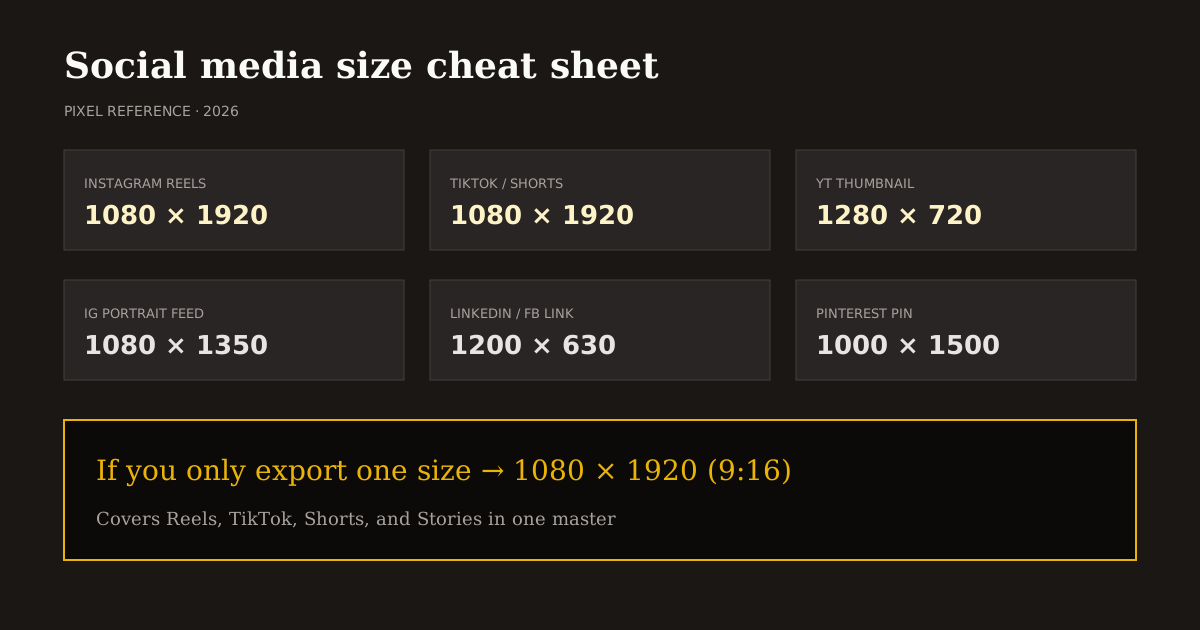
Social Media Size Cheat Sheet

Bookmark this cheat sheet when you batch content. Same-day posts across platforms fail most often because of the wrong canvas — not because of weak hooks.

Table of contents

  1. If you only export one size
  2. How to use this cheat sheet in Reels Editor
  3. Will these sizes change?

Quick size reference

PlatformFormatSizeRatioNotes
InstagramReels / Stories1080×19209:16—
InstagramPortrait post1080×13504:5—
InstagramSquare post1080×10801:1—
TikTokVideo1080×19209:16—
YouTubeShorts1080×19209:16—
YouTubeThumbnail1280×72016:9—
FacebookStory / Reel-style1080×19209:16—
FacebookLink / landscape post1200×6301.91:1—
LinkedInPost image1200×6271.91:1—
LinkedInCover1584×3964:1—
X (Twitter)Post image1600×90016:9—
PinterestStandard pin1000×15002:3—

If you only export one size

Make it 1080×1920 (9:16). That single master covers Instagram Reels, Stories, TikTok, YouTube Shorts, and Facebook Stories-style placements.

Add a second export only when the surface is clearly landscape: YouTube thumbnails (1280×720), link previews (~1.91:1), or X post images (16:9).

Still images for feed grids can use 4:5 on Instagram when you are not posting a Reel. Do not force every static post into 9:16 unless the creative is truly vertical.

How to use this cheat sheet in Reels Editor

Open Resize Video or Resize Image, pick the platform preset that matches the row above, then drag the subject into safe margins. Download MP4 or PNG locally.

For campaigns with many sizes, start from the highest-resolution source and crop down. Never upscale a small social download into a LinkedIn cover and expect clarity.

Pair this sheet with the safe-area guide when the asset is vertical video. Pixel size gets you accepted; safe margins get you readable.

Will these sizes change?

Platforms tweak UI often; they change native canvas sizes less often. 9:16 for short-form and 16:9 for YouTube thumbnails have been stable creative standards.

When a platform ships a new surface, update the row — do not abandon the master hierarchy. Vertical short-form still wants 1080×1920 first.

Reels Editor presets mirror this cheat sheet so your editor UI and this article stay aligned.

Related reading

  • Best Reel Size Guide (2026)Format Guide
  • Instagram Reel DimensionsFormat Guide
  • TikTok Aspect Ratio ExplainedFormat Guide
  • Thumbnail Size Guide for Reels, Shorts & YouTubeFormat Guide

اكتشف المزيد

Tools to apply this guide

محررات صور وفيديو مجانية — خاصة، تعمل في المتصفح، ولا تحتاج إلى حساب.

  • Resize videos for InstagramResize, crop, and reframe video or still images for Instagram Reels, TikTok, and YouTube Shorts.→
  • Resize images to exact dimensionsChange the pixel dimensions of any photo without desktop software.→
  • Crop images for InstagramCrop any photo to the aspect ratio you need in seconds.→
  • Export video to MP4Every Reels Editor tool exports MP4 files optimized for Instagram Reels, TikTok, and YouTube Shorts.→

Frequently asked questions

What is the most important social media video size?
1080×1920 (9:16) for Reels, TikTok, and Shorts.
What size is a YouTube thumbnail?
1280×720 (16:9).
Where can I resize to these dimensions?
Use Reels Editor Resize Video or Resize Image presets — processing stays in your browser.

Resize video to these sizes →

← Back to the blog